

Product teams running Figma without a shared system still miss launch windows, regardless of how strong their individual design work is. According to a 2025 UserTesting study cited in Figma’s Design Statistics library, validating designs before development reduces iteration cycles by 25%, helping teams avoid millions in developer rework costs. The gap between a polished Figma file and a smooth product launch is almost always a workflow gap.
This article covers the specific Figma workflow practices that product managers, design leads, and startup founders at B2B SaaS companies use to cut handoff friction and ship faster. From file structure to component architecture to dev-ready annotations, the goal is a workflow your whole team follows, not just your most senior designer.
Key Takeaways
- Consistent file architecture (Cover, Components, Ready for Dev, Graveyard) makes any Figma project self-navigating from day one
- The most common Figma workflow breakdown is missing system ownership, not missing feature knowledge
- Auto Layout, Variants, and Variables are the three building blocks that keep a design system maintainable at scale
- Validating designs before development reduces iteration cycles by 25% and significantly cuts downstream rework costs (UserTesting, 2025)
- A five-step handoff checklist closes the gap between ‘design done’ and ‘development ready’
- The structural habits that produce clean Figma files also determine how fast a product communicates its value in the market
How to Structure Your Figma Files Before You Draw a Single Frame
Figma file organization separates teams that move fast from teams that spend twenty minutes every morning hunting for the right version. A structured Figma file tells every team member exactly where to look, what is in progress, and what is production-ready.
Set up a standard page architecture across every project not just the current one. Every file in the workspace follows the same five-page structure:
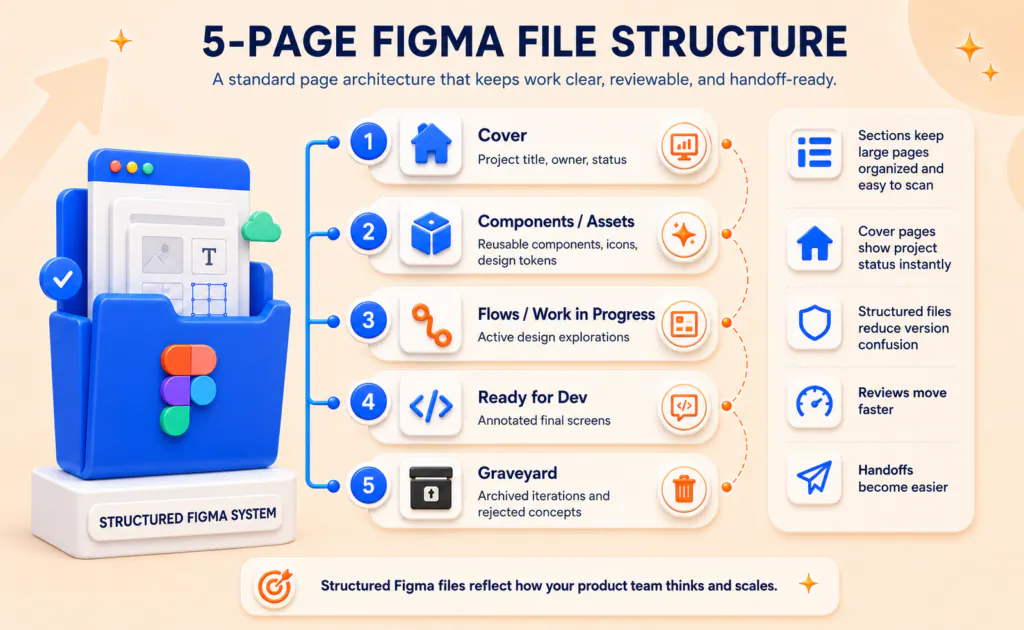
Group related frames inside Sections (Shift+S) within each page. When a single page holds 30 or more frames, loose frames on an open canvas become unreadable at any zoom level. Sections preserve context and keep navigation fast.
Set the Cover frame as your file thumbnail and include a status label. Teams browsing the Figma home screen see the state of every project instantly, without opening a single file.
A structured file architecture is not additional overhead. It is the overhead you eliminate the next time a developer asks ‘which version is final,’ a new designer joins mid-project, or a stakeholder opens the file without a walkthrough.
The structure gets your team into the file correctly. What breaks the workflow once everyone is inside is the subject of the next section.
| Your Figma file structure reflects exactly how your product team thinks. Talk to ThirdMeta about building operational clarity into your product workflow. |
Why Most Figma Workflow Problems Are Not a Figma Problem
Figma workflow problems in most product teams are a team discipline and ownership issue, not a tool literacy gap. Most product teams at scaling B2B SaaS companies already know what Auto Layout, Components, and Dev Mode do. They still end up with inconsistent files, duplicate components, and handoffs that generate ten Slack clarification messages per screen.
A 2025 CollabSoft study cited in Figma’s Design Statistics report found that 91% of designers believe designers and developers are at least sometimes ‘too different’ to work together effectively. The gap is not tool literacy. It is working norms.
| “Design is not just what it looks like and feels like. Design is how it works.”– Steve Jobs, Co-founder, Apple91% of designers say design-dev collaboration breaks down not because of tools, but because of misaligned working norms. |
Most Figma teams operate without a designated component library maintainer, an agreed naming convention, or a shared definition of what ‘done’ means before a design moves to the dev column. New team members inherit these ambiguities and compound them over two or three sprint cycles.
In work with SaaS product teams at the growth stage, the pattern appears consistently: the files are technically competent and organizationally chaotic. Components exist but are not consistently used. Naming conventions are documented but not enforced. The Ready for Dev page contains screens in three different states of completion.
Teams that run clean Figma workflows have one person who owns the system: a design lead, a senior designer, or a dedicated design ops function. That person sets naming rules, runs quarterly component audits, and gates the Ready for Dev page with a real review step before anything moves to engineering.
So what does this mean for your team: without a designated system owner, any workflow practice your team implements this week will drift within two sprint cycles. The fix is not more feature knowledge. It is an accountability structure that the workflow depends on.
The next section covers the specific design system habits that make that accountability structure worth building and maintaining.
Building a Design System That Survives Scale
Figma design system best practices center on three building blocks: Auto Layout, reusable Components with Variants, and shared Variables. A design system built on these three is maintainable by any team member, not only the designer who originally created it.
Auto Layout: The Foundation of Dev-Ready Design
Auto Layout is the single Figma practice most directly connected to handoff quality. Frames built with Auto Layout produce spacing, padding, and resize behavior that developers can inspect in Dev Mode without interrupting the designer for a clarification call.
Apply Auto Layout to every button, card, input field, list item, and page section. When a developer opens the file and the spacing is consistent and inspectable, they build without interruption. That uninterrupted build time is where the actual velocity difference between product teams shows up.
Components and Variants: One Source of Truth, Multiple States
Turn every repeated UI element into a Component. Use Variants to manage all interaction states (default, hover, disabled, error, loading) inside a single Component structure. The practical outcome: when a button color changes globally, you update one Component and every screen across the project reflects the change instantly.
The alternative: each designer modifies individual button instances. By month three of a fast-moving product, the file contains 14 slightly different button versions and no developer can identify the canonical one. Component discipline is what prevents that.
Styles and Variables: The Design Token Layer
Define global color styles, typography styles, and effect styles before the first screen is designed. In 2026, Figma’s Variables feature manages design tokens natively, connecting theme logic directly to codebase token names. This makes Dark Mode and theme management a configuration decision, not a redesign.
A 2025 Figma report found that 78% of design and development professionals say AI tools significantly speed up their workflows. Figma’s AI-powered layer naming and variable suggestions, expanded through 2025 and 2026, reduce the manual overhead of maintaining clean, consistent files across large projects. Teams exploring how AI is reshaping workflows more broadly will find the same patterns emerging in SEO automation for B2B SaaS fewer manual repetitive tasks, faster iteration cycles, and more time directed at high-judgment work.
When a component library is built on Auto Layout, Variants, and Variables, a single component update propagates across hundreds of screens in seconds. Shorter design review cycles, fewer developer questions, and a codebase that does not drift from the design file between sprints: that is the direct business output of this investment.
The Design-to-Dev Handoff Checklist Your Team Is Probably Skipping
The Figma design-to-dev handoff requires five specific documented steps that most product teams skip or compress under deadline pressure. Designers consider a screen done when it looks right. Developers consider it done when every interaction state is documented, every spacing value is inspectable, and every component is traceable to the codebase.
Run this checklist before any design moves to the Ready for Dev page:
- Mark the frame in Dev Mode. Use Figma’s Dev Mode to explicitly flag screens as ‘Ready for Dev.’ Developers get a filtered view that shows only what is final and approved, not work-in-progress explorations alongside finished screens.
- Name every layer contextually. Layer names become class names in exported code. ‘Frame 247’ is not a class name. ‘card-product-primary’ is. Contextual naming at the design stage removes an entire category of developer questions before they are asked.
- Annotate every interaction that static design cannot show. Loading states, error messages, hover behaviors, and edge cases require sticky notes or annotation components directly on the canvas. A static screen shows the happy path. Annotations show everything else.
- Align variable names with engineering codebase tokens. If the engineering team uses ‘primary-blue-500’ as a token, the Figma color variable must match exactly. Teams that skip this step create a translation layer that costs hours on every implementation cycle.
- Trace every asset to a main component in the Assets panel. Every icon, image, and illustration on dev-ready screens must link to a main component, not exist as a flat, detached copy with no traceable source.
According to a 2025 Adobe study cited in Figma’s Design Statistics report, teams without centralized design resources see non-design employees spending up to 29 hours per week recreating visual content that already exists somewhere in the organization.
The handoff checklist prevents that duplication from migrating into the engineering sprint. The same principle centralized, reusable assets versus scattered one-offs applies directly to B2B content distribution channel strategy: organizations that systematize how content is produced and routed to the right channels stop rebuilding from scratch every campaign.
Running this checklist manually every sprint adds up fast. ThirdMeta works with product teams to build systems that make clean handoffs the default, not the exception.
What a High-Functioning Figma Workflow Looks Like in Practice
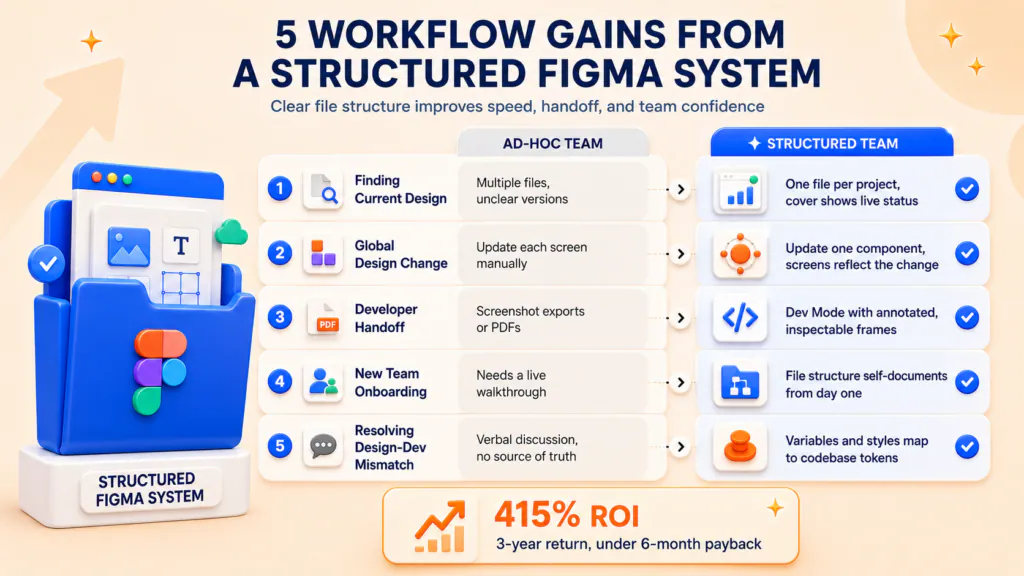
A functioning Figma workflow standardizes file navigation, component updates, handoffs, and team onboarding through agreed structure. Most teams know what a broken Figma workflow produces: Slack threads asking ‘which file is the latest version,’ developers building from screenshot exports, and a component library no one maintains because no one owns it.
Here is the contrast across five workflow moments that determine how fast a product team ships:
| Organizations that invest in design insight platforms achieve a 415% ROI over three years,with the investment paying for itself in under six months. |
The structured team ships the same features with fewer review cycles, fewer developer clarification requests, and fewer post-launch design corrections. The structural investment compounds as both the product and the team grow.
| Your Figma files reveal how fast your product can actually move. If design workflow is the bottleneck between your product and your growth targets, talk to ThirdMeta. |
Why ThirdMeta?
Product teams that run clean Figma workflows do not just ship faster. They build marketing assets faster, iterate on positioning faster, and close the lag between what the product delivers and what the market understands. That is where ThirdMeta operates: at the point where product development velocity connects directly to go-to-market execution.
We work with B2B SaaS teams that have moved past the ‘just get it built’ phase and are beginning to feel friction across design, content, and growth workflows. The symptom is consistently the same: a product that outperforms competitors in capability but falls behind in how quickly that capability becomes visible to the right buyers.
- Workflow audit: We identify exactly where time is being lost between build and launch across your design and content pipelines
- System design: We build content and design systems that match the speed of a structured product development cycle, not a two-quarter lag behind it
- ICP positioning: We translate design decisions into positioning, messaging, and SEO content that reaches your ICP before competitors do
- Growth infrastructure: We build the marketing and content infrastructure that scales alongside your product team as the company grows
Figma workflow best practices get your designs shipped cleanly. ThirdMeta makes sure the right buyers know about them.
Conclusion
A Figma workflow that works is not a collection of features used correctly. It is a set of team agreements enforced through structure: a consistent file architecture, clear component ownership, and a handoff checklist that defines what ‘done’ actually means before a design reaches engineering. Teams that build this structure ship consistently. Teams that defer it ship eventually.
The same structural thinking that produces a clean Figma file applies to how a product communicates with its market. When design and go-to-market systems operate at the same speed, growth stops being a lag metric and starts being a direct output of how the product team operates.
Frequently Asked Questions
The best Figma project structure uses a standardized page system across all files: Cover, Components/Assets, Flows/Work in Progress, Ready for Dev, and Graveyard. This structure makes any Figma project navigable for any team member without a guided walkthrough. Consistent structure across projects is the foundation of scalable Figma workflow best practices.

Sr. Content Writer
Vamshi Vadali is Third Meta's Content Team Head and the guy who banned fluff from all blog posts. He specializes in SEO, GEO (Generative Engine Optimization), and AEO (Answer Engine Optimization): the trifecta that gets B2B SaaS content ranking in both Google and ChatGPT. Vamshi doesn't write content. He engineers MQL machines. His philosophy? Good writing needs data and clarity, not buzzwords. He writes like a CFO reads: straight to the outcomes. When he's not optimizing for AI Overviews, he's debating whether LLMs prefer Oxford commas.